After almost a year, I am writing again, and this time I wanted to document something I worked on while being part of the infrastructure team.
This was not my own project. It was an existing service, and I was given a task to design and set up a CI/CD pipeline for it. The initial expectation was to use Jenkins, which is what most teams were already using. But after looking at the requirements and the kind of setup we needed, I decided to go with GitHub Actions instead. It removed the need to manage a Jenkins master, handle upgrades, and deal with additional operational overhead.
In this blog, I will go through how the deployment originally worked, what problems it had, how I redesigned the system, and what issues I faced while building it. Along with that, I will also highlight things you can take from this and apply in your own CI/CD pipelines, especially if you are working with EC2-based systems.
How deployments were happening earlier
The deployment process was simple. You SSH into a machine, run git pull, and restart the workers using supervisor. This works fine in the beginning, but it starts breaking once the system grows.
Every machine needs GitHub credentials, which is not safe. There is no proper record of what version was deployed or when. Rollback is manual and slow. Also, when new instances are launched by the Auto Scaling Group, they cannot deploy anything on their own.
If you are still doing deployments like this, this is usually the first thing to fix. Manual access and hidden dependencies are the main reasons systems become hard to manage.
Design decisions and approach
Since I was designing the pipeline from scratch, I tried to keep it closer to how things are done in production systems. Instead of using GitHub deploy keys or storing AWS credentials, I used OIDC for authentication. Instead of SSH, I used SSM for running commands on instances, and dev and prod were kept in separate AWS accounts.
The idea here is simple. Try to remove long-lived credentials completely and avoid direct machine access wherever possible. Once you do that, a lot of security and operational problems go away automatically.
Moving from git pull to artifacts
The next decision was how code should reach the instances. Instead of doing git pull inside the machine, I moved to an artifact-based approach.
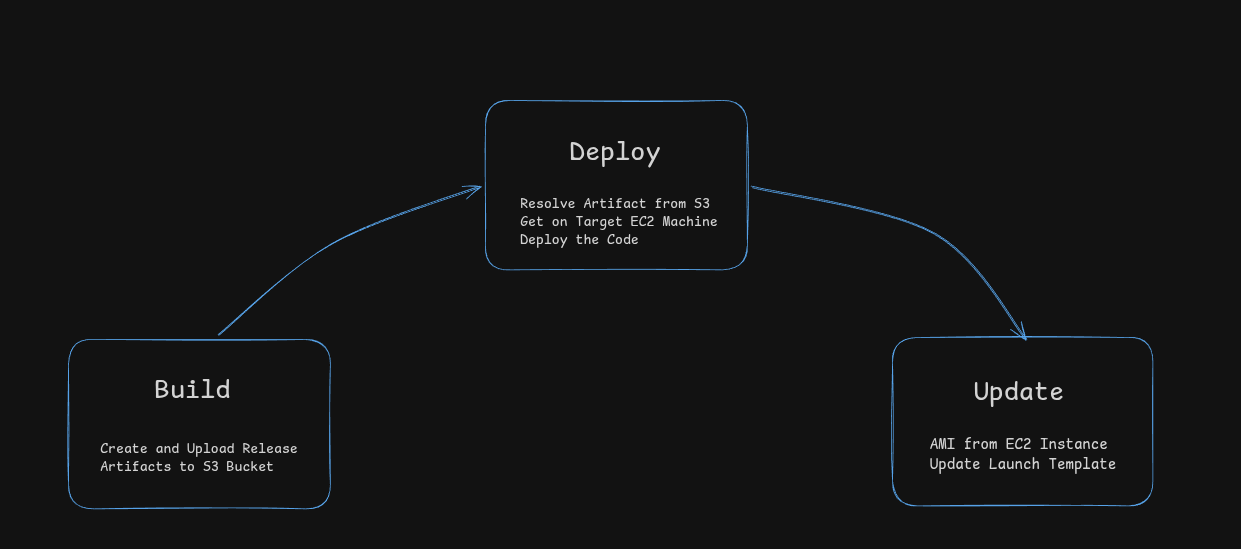
Whenever code is pushed or a release tag is created, GitHub Actions packages the repository into a compressed file and uploads it to S3. Each artifact is named using either the tag or commit SHA, so every version is clearly identifiable. During deployment, instances download this artifact from S3 and update themselves.
If you are building a pipeline for EC2 or any non-container setup, this is a useful pattern. It removes dependency on GitHub during deployment and ensures that every instance gets the exact same version of code.
Authentication using OIDC
Authentication is handled using OIDC. When a GitHub workflow runs, it gets a temporary token, AWS validates this token, and provides temporary credentials. Nothing is stored in GitHub.
I faced an issue here because the OIDC sub claim changes format when GitHub environments are used. My IAM trust policy was not matching it correctly, which caused role assumption to fail. The fix was to check the actual token format and update the trust policy.
If you are setting this up, it is important to verify the claims properly instead of assuming the format.
Deployment using SSM instead of SSH
For deployment, I used AWS SSM instead of SSH. This removes the need for SSH keys and open ports, and everything runs through IAM.
However, SSM runs scripts using /bin/sh, not bash. My script used bash-specific syntax, so it failed with syntax errors. To fix this, I encoded the script, sent it via SSM, decoded it on the instance, and executed it using bash.
If you are using SSM, keep this in mind because it can break scripts in unexpected ways.
Ensuring latest always means stable
Initially, latest.tar.gz was updated during the build step. That means even a broken build becomes the latest version, and new instances will use it.
I moved this update to after deployment, and only if all instances pass health checks. Now, latest always points to a working version.
This is a small change, but it prevents a lot of issues in production.
Reducing risk with canary deployments
To reduce deployment risk, I added canary deployment support. Instead of deploying to all instances, I can first deploy to a single instance, verify it, and then deploy to the rest.
This is simple to add but very useful, especially when changes are risky.
Keeping ASG instances in sync
After deployment, new instances were still launching with old code because the Auto Scaling Group was using an older AMI.
To fix this, I added an AMI update step. The workflow creates an AMI from an instance, updates the launch template, and sets it as default. Now, new instances come up with the latest code.
This is not fully immutable infrastructure, but it keeps deployments and infrastructure in sync.
Issues faced during implementation
While building this, I faced multiple issues.
Tar was failing with "file changed as we read it" because the archive was created in the same directory. Moving it to /tmp fixed it. The dependency diff check was placed after rsync, so it always showed no changes. Moving it before rsync fixed it.
SSM runs as root, so files became root-owned. The application runs as ubuntu, so this caused permission issues. I fixed this using chown and running pip as the correct user.
These are small issues, but they can take time to debug if you have not seen them before.
Limitations
This system still has limitations. Health checks are basic, and just checking if a process is running is not enough. There is no load balancer level traffic control, so deployments are not truly zero-downtime. Dependency installation is not fully deterministic, and SSM may not scale well for very large systems.
If you are building a CI/CD pipeline for a similar setup, focus on a few core things. Remove credentials, avoid manual access, use versioned artifacts, and make sure new instances always start from a verified version.
Even without advanced tools, these changes can make a big difference.
Final thoughts
Compared to the previous setup, things improved a lot. No SSH is required, no credentials are stored, deployments are traceable, rollbacks are easier, and new instances behave consistently.
More importantly, deployment is no longer something that people worry about.